
Easy Playlist Creator - Google Play
You'll be able to see results in few seconds.
Publisher Description
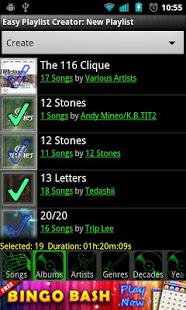
Like your music player but hate making playlists? Press, Click, Add to Playlist, Press, Click, Save, Press, Click, Add to Playlist, Press, Click... throw across the room...
EPC can easily create, load, modify, and delete playlists. Add songs individually by album, artist, genre, decade, or year. Easy Playlist Creator can even combine multiple playlists with just a few clicks. If you have any issues with the application we monitor the comments daily and love to hear feedback.
Current Features:
1. Quickly select songs, albums, artists, genres, decades, years, and playlists
2. Delete single or multiple playlists at once
3. Easily clear selection to start over
4. Load existing playlists to modify them
5. Advanced Views: each tab has links to related info for example: songs in an album or 80's music
6. Shows statistics like number of songs currently selected, total time duration of selected
Coming soon:
1. Other playlist statistics
2. Generate multiple playlists
3. More tabs like decade, year, bitrate(sound quality), length/duration so you can add songs based on things like 80's music, songs longer than 3 minutes, or songs that are CD quality or better, etc...
4. Auto Generate "hard" copies of playlists generated by android. By default playlist are saved in a database and not a file. So, if you move your sdcard to a new phone those playlists do not follow.
selection, etc...
5. Generate multiple playlists at once
6. Merge Playlist
Change Log
v2.3
FIXED
Major bug fix
v2.2
IMPROVED
error handling
FIXED
Tab images
Select All/None minor bug
ADD
Duration tab
REMOVED
Random full screen ad pop-ups
v2.1
ADDED
Stats: number of songs selected, duration of selected
Ability to delete
Actions bar for switching to modes like creating and deleting
New tabs and links to decades and years
Select All and De-select All options to the songs pop-up
Settings: default path, file type, and name
FIXED
Force close on tab click during load
v2.0
IMPORVED
Load speed(older devices may still load slow because the app loads a lot of info when starting)
FIXED
Settings to email me suggestions
Browser now show shows complete list
Album art loading
Re-initialize playlist after sdcard scan
Filter for "is_music" which caused some versions of android to not load any songs - Anybody with android 2.2 or 2.3 please confirm if it works.
ADDED
Fast scrolling with indexing
Links to songs by album, by artists, in genre, and in playlist
v1.6
IMPROVED
File explorer feature for saving playlists
FIX
Bug preventing songs list loading on Android 2.2(Not 100% sure need someone with 2.2 to verify as I don't have a 2.2 device)
v1.5
ADD
Ability to browse sdcard when selecting save location
Many minor layout changes
Improved error handling
v.1.1
FIXED
Problem loading on Android versions higher that 2.3.7
About Easy Playlist Creator
The company that develops Easy Playlist Creator is N.Y.A.N. App. The latest version released by its developer is 1.0 .
To install Easy Playlist Creator on your Android device, just click the green Continue To App button above to start the installation process. The app is listed on our website since 2013-09-16 and was downloaded 0 times. We have already checked if the download link is safe, however for your own protection we recommend that you scan the downloaded app with your antivirus. Your antivirus may detect the Easy Playlist Creator as malware as malware if the download link to com.nyanapps.easyplaylistcreator.free is broken.
How to install Easy Playlist Creator on your Android device:
- Click on the Continue To App button on our website. This will redirect you to Google Play.
- Once the Easy Playlist Creator is shown in the Google Play listing of your Android device, you can start its download and installation. Tap on the Install button located below the search bar and to the right of the app icon.
- A pop-up window with the permissions required by Easy Playlist Creator will be shown. Click on Accept to continue the process.
- Easy Playlist Creator will be downloaded onto your device, displaying a progress. Once the download completes, the installation will start and you'll get a notification after the installation is finished.
Program Details
System requirements
Download information
Pricing
Version History
version Free
posted on 2013-09-16
version Free
posted on 2013-03-23
Several fixes and updates
Disclaimer
Official Google Play Link
We do not host Easy Playlist Creator on our servers. We did not scan it for viruses, adware, spyware or other type of malware. This app is hosted by Google and passed their terms and conditions to be listed there. We recommend caution when installing it.
The Google Play link for Easy Playlist Creator is provided to you by apps112.com without any warranties, representations or guarantees of any kind, so access it at your own risk.
If you have questions regarding this particular app contact the publisher directly. For questions about the functionalities of apps112.com contact us.
